Performance Controls Settings
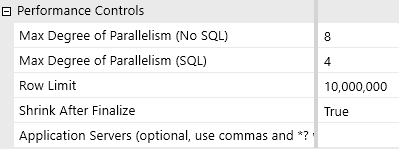
Max Degree of Parallelism (No SQL)
The work of importing data can be split between multiple parallel processors. The default setting is 8 for non-SQL operations (Application Server). The optimal number depends on your server configuration.
IMPORTANT: The default value should only be adjusted with guidance from Product Support or your implementation consultant.
Max Degree of Parallelism (SQL)
This option controls how many threads are used to perform parallel tasks on the SQL database server itself, such as writing to tables. The default value is 4.
IMPORTANT: The default value should only be adjusted with guidance from Product Support or your implementation consultant.
Row Limit
This sets an upper limit on the number of records written to the Blend table per execution of query. The default is set to 100K. The maximum is 500K. This is estimated by analyzing the Blend Log File, base level rows, and the Explosion factor to determine free memory usage.
Shrink After Finalize
When set to True, this setting reduces the amount of empty space in the database. This property should not be changed.
Application Servers
NOTE: This property is only used for Platform Version 7.4.4 and earlier. Do not name application servers using this field in Platform Versions 8.0.0 and later.


